After setting the source file type and the source file directory as well as the schema type Opportunities some options will appear in the navigation bar:
3. Conditions
6. Parent Record Identification
7. Misc Options
To get to the setting Easy Mappings you either click on the right arrow in the lower bar or on Easy Mappings in the navigation bar.
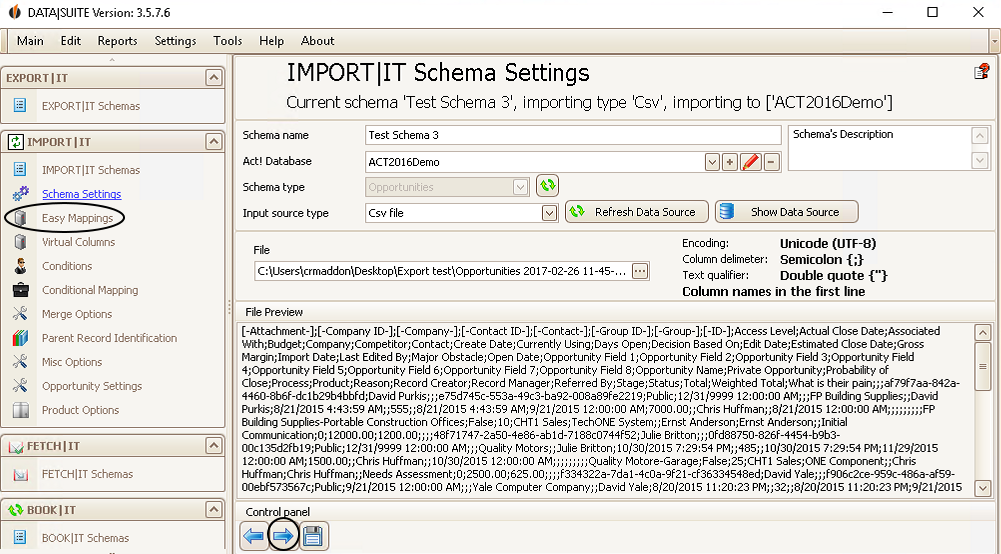
You can always switch between the options by clicking on on the arrow buttons or by clicking on the particular option in the navigation bar.
The settings Easy Mappings, Virtual Columns, Conditions, Conditional Mapping and Merge Options are already explained for the contact import.
There are additional opportunity settings for the Misc Options:

You can choose not to concatenate any products, that means that new ones will be added every time.
Also, you can decide on concatenating products by name and item.
There is the opportunity to look for duplicates among the opportunities as well.
If an opportunity exists already but has a parent record in the source file (e.g. a contact), then that opportunity cannot be imported again but instead assigned to that contact.
Finally, you are able to ignore data records when the parent record already has an opportunity.
The setting Parent Record Identification is already explained for the company import.
All explanations apply to the typical fields of the opportunities.
Furthermore, there are the Opportunity Settings. You can find out how to import products with the opportunities in the chapter Product Options.

