The menu bar consists of Main, Edit, Reports, Settings, Tools, Help and About.
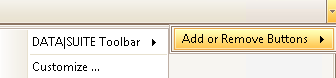
This is the standard DATA|SUITE menu bar. With the arrow button in the top right corner you can edit it.
Under DATA|SUITE tool bar you can tick which menu points should be displayed. Under Customize you can create your own symbol bars. |